 scale(0.95) translate(-50 -50)'%3E%3Cg transform='rotate(-12 50 50)'%3E%3Cpath fill='%23F2B705' stroke='%23FFFDF5' stroke-width='3' stroke-linejoin='round' d='M32 22 H80 Q88 22 88 30 V70 Q88 78 80 78 H32 L12 50 Z'/%3E%3Ccircle cx='27' cy='50' r='5' fill='%230F2A22' stroke='%23FFFDF5' stroke-width='3'/%3E%3Cpath transform='translate(30 22) scale(0.56)' fill-rule='evenodd' fill='%230F2A22' d='M32 22 H57 C68 22 74 28 74 36 C74 42 71 46 66 48 C73 50 77 55 77 63 C77 72 70 78 59 78 H32 Z M44 32 H55 C60 32 62 34.5 62 37.5 C62 40.5 60 43 55 43 H44 Z M44 52 H57 C62 52 65 55 65 59 C65 63 62 66 57 66 H44 Z'/%3E%3C/g%3E%3C/g%3E%3C/svg%3E) Benta掌柜
Benta掌柜Benta — your store's cash register, utang list and inventory, on your phone.
For sari-sari stores, mini-marts, carinderias and market stalls. Sell with a tap, know who owes what, and see what is about to run out — even when the signal drops.
📄 Read the illustrated user manual (free PDF)
First install? Your phone will ask to allow “Install unknown apps” — tap Allow.
On iPhone: open Benta in Safari, tap Share, then “Add to Home Screen”.
- Sells offline
- GCash and Maya recorded
- Free plan ₱0
- English, Filipino, 中文 and 3 more

₱433.00utang, written down — not forgotten
Everything the notebook used to do, without the guesswork.
The problems every store owner knows, and what Benta does about them.
Pick your kind of store. Benta sets itself up for it.
The menu, the selling screen and the home page change with the store type. You can switch later.
Sari-sari store
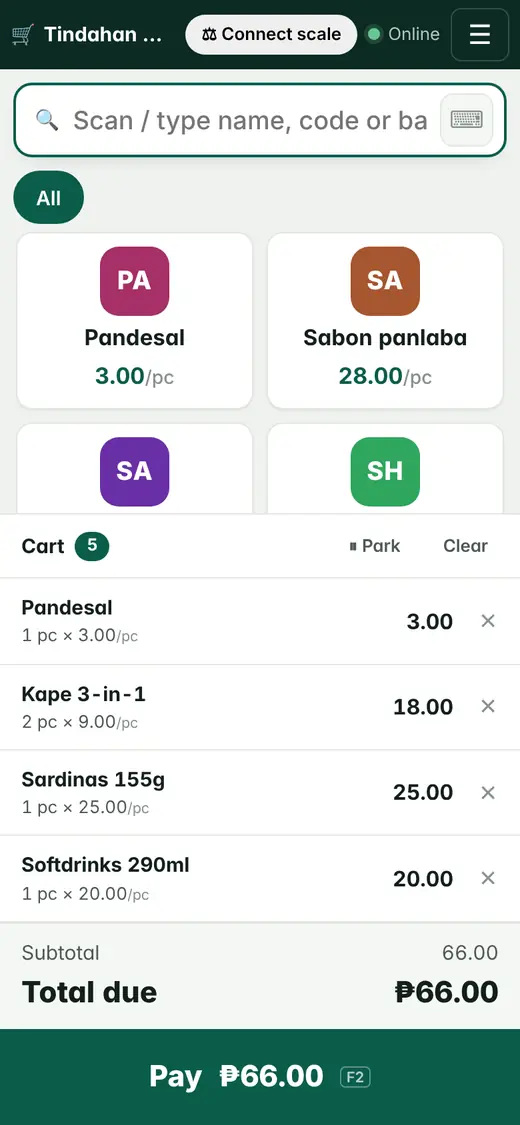
- Big picture buttons for quick selling
- Utang list with reminders
- Tingi: sell by the piece from a pack
- Today's sales and cash in the drawer

Mini-mart
- Scan barcodes with a scanner or the phone camera
- Members and points, returns, stock count
- Batches and expiry dates, price lists
- VAT and BIR-ready reports

Carinderia / small restaurant
- Table map, dine-in, takeout and delivery
- Kitchen screen or kitchen printer
- Split bills, service charge, Senior / PWD discount
- Recipes deduct ingredients; cost per dish

Made for a small store's real day.
These are real screens from Benta, not mock-ups.


Keeps selling offline
No signal? The register keeps working and uploads the sales when you are back online — never counted twice.
GCash and Maya recorded
Mark a sale as paid by GCash, Maya, card or bank with the reference number, so the e-wallet matches at closing.
Utang and reminders
Credit limits per customer, partial payments, and a reminder message you can send by SMS, WhatsApp or Viber.
Scan barcodes
USB or Bluetooth scanners, or the phone camera. Weighing-scale labels work too.
Daily price board for fresh goods
Vegetables, fish and meat change price every morning. Set today's prices once; the register and orders follow.
Kitchen screen
Orders from the tables go to a tablet in the kitchen or to a kitchen printer, split by station.
Reports that make sense
Sales by day and product, best sellers, profit per month, cash per shift — and VAT, X and Z readings for BIR.
Any phone, tablet or PC
Open it in the browser and add it to your home screen. Nothing to install from the app store.
Scan with your phone to open Benta.
Six languages
English, Filipino, 简体中文, 繁體中文, Bahasa Indonesia and Tiếng Việt. Each staff member picks their own.
Automatic backups
Your data is backed up automatically every day, encrypted. Export everything to Excel any time.
Start free. Pay only when the store grows.
No contract. Stop paying any time and you go back to the Free plan — your data stays.
Prices in pesos, per store. Pay by GCash, Maya or card inside the app. Need more staff or branches? Contact us.
Your store's records stay yours.
Security and backups
Each staff member has their own login and only sees what you allow. Every change is logged. Backups run automatically every day, encrypted.
An honest note on BIR
Benta gives you BIR-ready reports: VAT summary, X and Z readings, sales by TIN. Official receipts need your own BIR permit (PTU / ATP) and accreditation — until you enter them, Benta prints “This is not an official receipt”. Ask your accountant.
Privacy
We follow the Data Privacy Act (RA 10173). We never sell your data or your customers' data. Download everything or close your account whenever you want.
Become a Benta partner.
You already visit stores every week. Bring them Benta, help them start, and earn from every store that stays.
Who it's for
- Sales agents and route sellers
- Distributors and wholesalers
- Accountants and bookkeepers
- POS and printer sellers
What you do
- Introduce Benta to stores in your area
- Help them set up products and their first sale
- Be the first person they call for help
What you get
- Recurring commission on every paying store you bring
- A free demo account to show stores
- Flyers and ready-made messages
- Training and a direct line to our team
Commission: contact us
Questions about the program? Email partners@bentaerp.com
Already a partner? Log in to your partner page
Apply
Fill in the form. It takes two minutes.
We call you
We talk about your area, the stores you know and the terms.
Bring your first stores
You get a demo account and materials, and earn for every store that subscribes.
Put Benta on your computer or phone
One store, the same data everywhere. Log in on as many phones and computers as you need.
Windows computer
The Benta desktop app opens in its own window, with an icon on your desktop. Nothing to install — download and double-click.
First time, if Windows says “Windows protected your PC”: click “More info” → “Run anyway”.
Or open Benta in Chrome or Edge and click the “Install” icon at the right of the address bar.
Android phone
Install it like an app: it opens full screen from your home screen and keeps selling when the signal drops.
First install? Your phone will ask to allow “Install unknown apps” — tap Allow.
- Open this address in Chrome:
- Tap ⋮ at the top right.
- Tap “Add to Home screen” (or “Install app”).
iPhone / iPad
No App Store needed. Add Benta to your home screen and open it from the icon.
- Open this address in Safari:
- Tap the Share button (square with an up arrow).
- Tap “Add to Home Screen”, then “Add”.
Step-by-step user manual
Every screen explained with real pictures — signing up, checkout, GCash, utang, reorder, stock counts, staff pay and the restaurant. Print it for your staff.
- 15 short chapters with a feature overview
- Real screenshots on almost every page
- Free PDF — no sign-up needed

Questions store owners ask
Does it work without internet?
Yes, selling does. The register keeps taking sales when the signal drops and uploads them when you are back online, without counting a sale twice. Reports and settings need internet.
Which phones can I use?
Any Android phone or iPhone from the last few years, tablets and PCs. Open Benta in Chrome or Safari and add it to your home screen — it works like an app.
Can I print receipts?
Yes. Benta prints to 58 mm and 80 mm thermal receipt printers your phone or PC can print to. Restaurants can print kitchen tickets or use a kitchen screen. USB and Bluetooth barcode scanners work.
How do I move my data in or out?
Import products, customers, opening stock and utang balances from Excel or CSV — there are ready layouts for Loyverse, QuickBooks, Xero and Odoo. You can export everything any time.
Can I cancel any time?
Yes. Plans are monthly or yearly with no contract. If you stop paying, the store moves to the Free plan and keeps its data.
Is Benta BIR-accredited?
Not yet. Benta gives you BIR-ready reports (VAT summary, X and Z readings, sales by TIN). Official receipts need your own BIR permit and accreditation; until those are entered, receipts say “This is not an official receipt”. Please check with your accountant.
Email us
- General questionshello@bentaerp.com
- Help with your storesupport@bentaerp.com
- Partner programpartners@bentaerp.com
- Plans, payments and receiptsbilling@bentaerp.com